

Markdown Editor
Build a Live Markdown Editor with Preview in React: that
- allows users to write markdown content on the
left paneand simultaneously view the rendered preview on theright pane. - Supports real-time rendering of markdown input.
- Provides a clean, responsive layout for editing and viewing markdown content.
- Utilizes the
markedlibrary to parse markdown into HTML.
Requirements
Libraries to Use
marked – A fast markdown parser and compiler. This library converts markdown syntax to HTML efficiently and supports most standard markdown features.
Markdown Editor Functionality
- Users can write Markdown in a
<textarea>input. - Input should support real-time rendering of:
- Headings (
#,##,###) - Bold (
**bold**), Italic (_italic_), Strikethrough (~~strike~~) - Lists, Blockquotes (
> quote) - Links, Images
- Inline and block-level code
- Headings (
- Use
marked.parse()for markdown-to-HTML conversion. - To render HTML safely from markdown input, use:
WheredangerouslySetInnerHTML={getMarkdownText()}const getMarkdownText = () => { return { __html: marked.parse(markdown) }; };
Features
You have to implement the following features
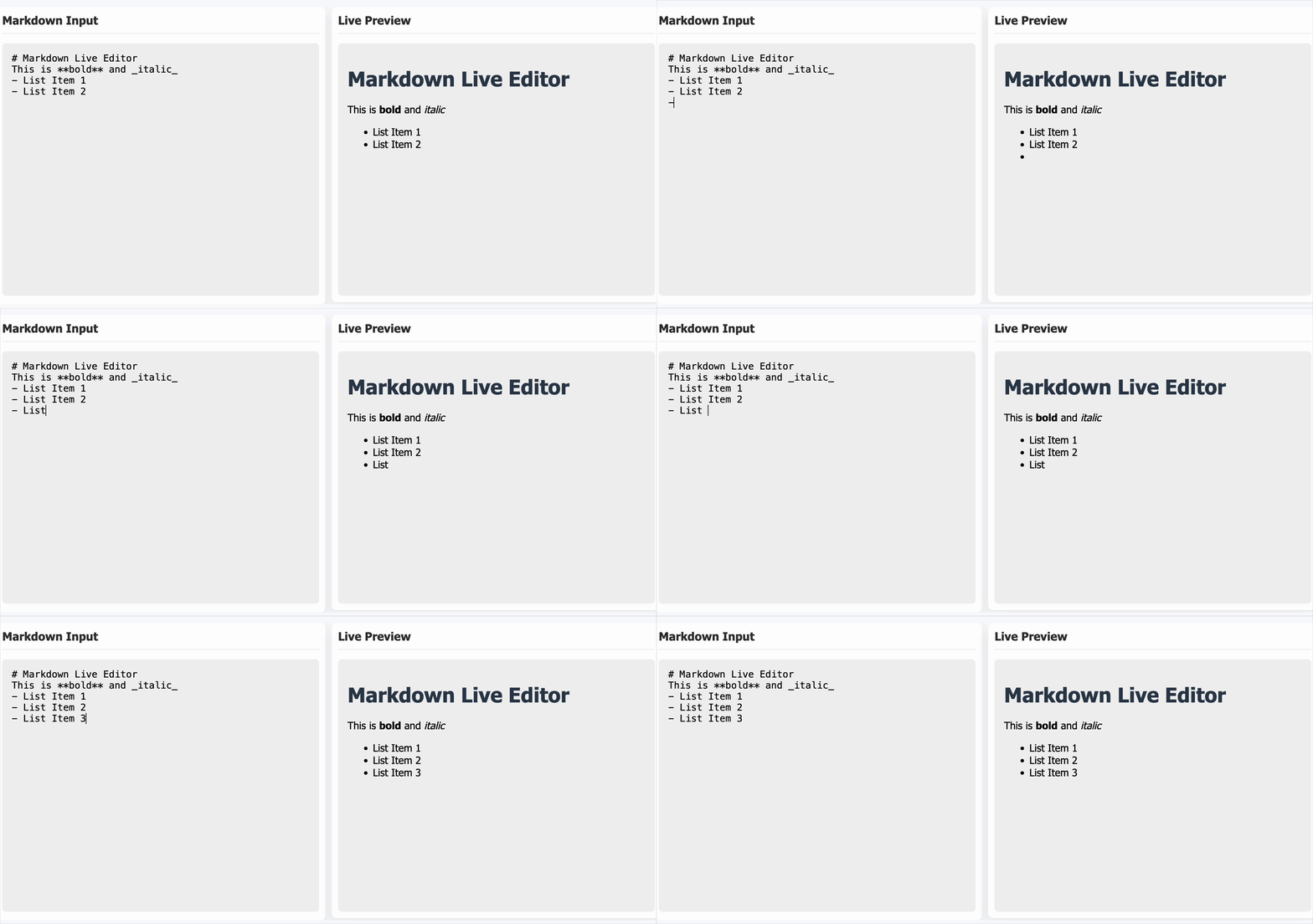
- Live Markdown Input & Preview
- There must be two headings:
"Markdown Input"above the input area"Live Preview"above the rendered preview
- Implement a controlled
<textarea>in the left pane where users can write markdown content. - On the right pane, display the real-time rendered markdown.
- Responsive Layout
- Ensure both panes are equal in height (400px).
- Layout must remain responsive on smaller screens (e.g., stacked view for mobile).
- Styling Enhancements
- Keep the input and preview section visually separated with proper padding and shadow.
- Maintain consistent styling between both panes.
Testing Instructions
To make your Markdown Editor easily testable, please use the following data-testid attributes in your component:
- Markdown input area
- The
<textarea>used for writing markdown must include: - Must have placeholder="Write Markdown here..."
- Rendered HTML preview
- The preview pane where rendered markdown appears must include: role="region"
Reference UI
Companies:
Solve Similar questions 🔥
Want to upskill? Explore our courses!

Namaste AI
Learn to build modern AI applications with real-world projects.

Namaste DSA
Master DSA from scratch with numerous problems, and expert guidance.

Namaste React
Wanna dive deep into React and become Frontend Expert? Learn with me now!

Namaste Frontend System Design
The most comprehensive and detailed course for frontend system design.

Namaste Node.js
Wanna dive deep into Node.js? Enroll into `Namaste Node.js` now!