

Leap year
React.js
easy
20 mins
Create a responsive Leap Year Checker component that lets a user input a year and check whether it is a leap year.
Requirements
- A label
"Enter a year:"indicating the user to enter a year. - The interface must include:
- An input field (
type="text") allowing the user to enter a year. - A button
"Check"that calculates leap-year status.
- An input field (
- A display area below the button which will show:
- The result if valid (
"YYYY is a Leap Year"or"YYYY is not a Leap Year") - Error message if input is empty (
"Please enter a year")
- The result if valid (
- Input can contain extra whitespace, which must be trimmed.
Edge Cases & Constraints
- Input must not be empty.
- Input must represent a valid integer year.
- Whitespace before or after the year must not cause errors.
- Leap-year logic:
- Year is leap if:
- Divisible by 400 OR
- Divisible by 4 but not by 100.
- Year is leap if:
- Error must show if input is empty or contains only whitespace.
- Result must update immediately on clicking
"Check". - Input should accept any integer (positive or negative), as the logic still holds.
Example Behaviors
// Example 1: Valid leap year
Input: "2020"
Click: Check
Result: "2020 is a Leap Year"

// Example 2: Valid non-leap year
Input: "2021"
Click: Check
Result: "2021 is not a Leap Year"

// Example 3: Input contains whitespace
Input: "  2028  "
Click: Check
Result: "2028 is a Leap Year"

// Example 4: Empty input
Input: ""
Click: Check
Result: "Please enter a year"
Data Test IDs (Required for Testing)
data-testid="label-date"— Label for the year inputdata-testid="year-input"— Input field for the yeardata-testid="check-btn"— Button to trigger leap-year checkdata-testid="result"— Display area for leap-year resultdata-testid="error-msg"— Error message container for empty/invalid input
Reference UI
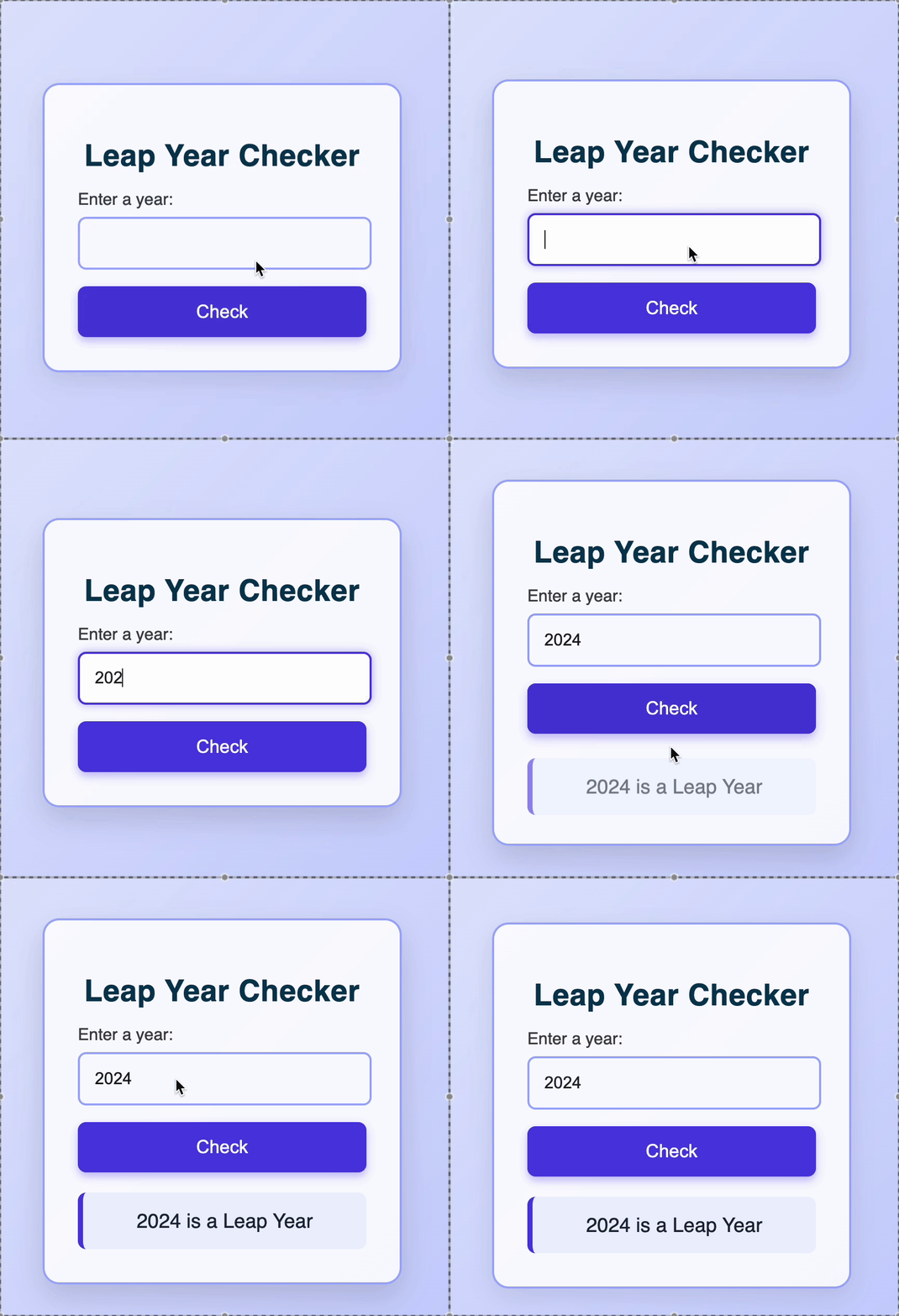
Preview what you need to build
Companies:
yahoo
oracle
intel
Solve Similar questions 🔥
Want to upskill? Explore our courses!

Namaste AI
Learn to build modern AI applications with real-world projects.
Namaste DSA
Master DSA from scratch with numerous problems, and expert guidance.

Namaste React
Wanna dive deep into React and become Frontend Expert? Learn with me now!

Namaste Frontend System Design
The most comprehensive and detailed course for frontend system design.

Namaste Node.js
Wanna dive deep into Node.js? Enroll into `Namaste Node.js` now!