

Event Management
Problem Description
Build a simple calendar application in React that allows users to:
- View a monthly calendar with dates in a grid.
- Add events (with title and date in YYYY-MM-DD format).
- Display multiple events on each day.
- Delete events when needed.
- Navigate between previous and next months.
- Highlight today’s date with a distinct style.
- Validate user input so events cannot be saved without a title or date.
The application should be functional, clean, and written without external dependencies (only React).
Functional Requirements
-
Calendar Display
- Show current month name and year in the header.
- Month navigation should use ‹ (previous) and › (next) buttons.
- Dates should be shown in a grid, starting with Sunday as the first day of the week.
-
Event Creation
-
Provide an Add Event button below the header.
-
Clicking it should open a modal with:
- Input for Event Title
- Input for Event Date (YYYY-MM-DD format)
-
The modal should also have Save, Cancel, and X (close) buttons.
-
-
Event Display
- Events should be displayed inside their respective day cells.
- Each event should be listed with a delete button (×) next to it.
-
Event Deletion
- Clicking the delete button should remove that event from the calendar.
-
Validation
- If the user clicks Save with an empty title → show
"Please enter event title". - If the user clicks Save with no date → show
"Please select event date". - The error message should be displayed inside the modal above the form.
- If the user clicks Save with an empty title → show
-
Highlighting Today
- The current date should be styled differently (e.g., bold background or border).
Data Test ID
calendar-container→ Wrapper of the calendar app.prev-month-btn→ Header navigation left button (‹).next-month-btn→ Header navigation right button (›).month-year-display→ Header text showing “August 2025” etc.add-event-btn→ Button below header to open modal.event-modal→ Modal wrapper.close-modal-btn→ Top-right close button in modal.event-title-input→ Input for event title.event-date-input→ Input for event date.save-event-btn→ Save button in modal.validation-error→ Error text inside modal.event-item→ Each displayed event inside a day.delete-event-btn→ Button inside each event item.
Reference UI
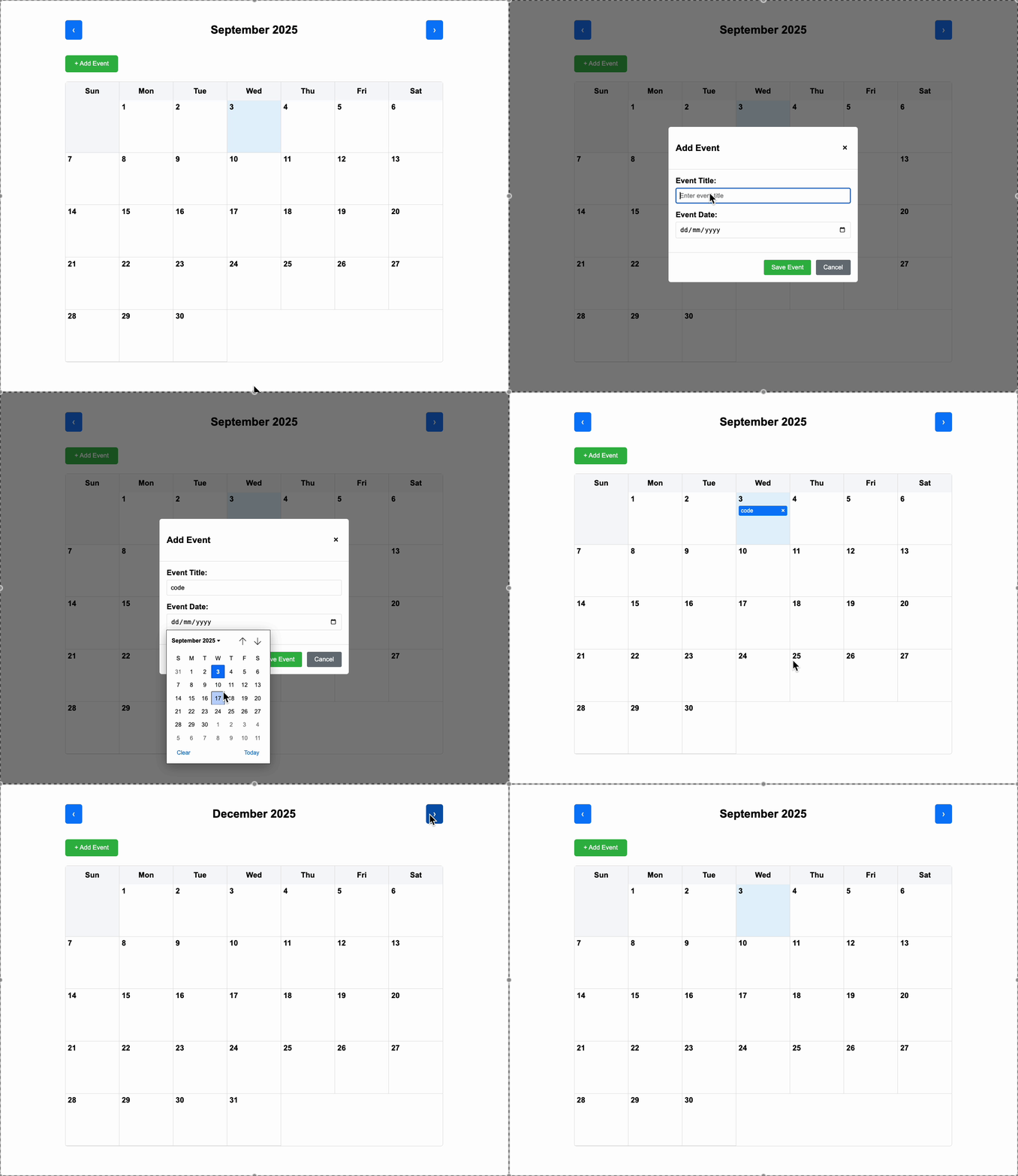
Companies:
Solve Similar questions 🔥
Want to upskill? Explore our courses!

Namaste AI
Learn to build modern AI applications with real-world projects.

Namaste DSA
Master DSA from scratch with numerous problems, and expert guidance.

Namaste React
Wanna dive deep into React and become Frontend Expert? Learn with me now!

Namaste Frontend System Design
The most comprehensive and detailed course for frontend system design.

Namaste Node.js
Wanna dive deep into Node.js? Enroll into `Namaste Node.js` now!